Global Position

Global Position
Celestial View shows the Sun and Moon around the Earth from space, plus Home and Lock Screen widgets and Siri shortcuts for your coordinates, sunset and moon phase.
Turn your iPhone into a precision navigation instrument: every major coordinate and grid format, a compass, altimeter, speedometer, HUD mode, a live world daylight map and the new Celestial View. Coordinates, grid references and astronomy are calculated on your device, so they keep working without a mobile-data signal.
Coordinates in Every Format
Read your position instantly in:
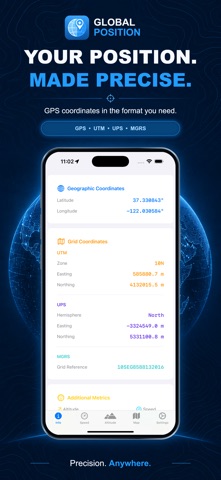
- Latitude and longitude in decimal degrees, DD-MM, DMS or radians
- Universal Transverse Mercator (UTM)
- Military Grid Reference System (MGRS)
- Universal Polar Stereographic (UPS), shown automatically near the poles where UTM and MGRS are undefined
Get a complete MGRS reference even on a ridge with no mobile signal.
Navigation Tools
- Compass with true and magnetic headings side by side
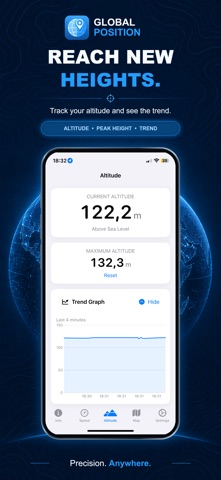
- Altimeter with a four-minute trend graph and session maximum
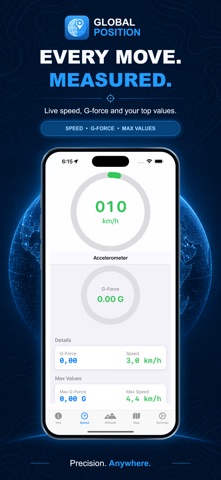
- Speedometer in m/s, km/h, ft/s, mph or knots
- HUD mode: rotate to landscape for a mirrored windscreen display that keeps the screen awake
- G-force gauge with gravity excluded, plus maximum G-force and speed records
- Flashlight for reading a map after dark
Sun, Moon and Sky
Swipe across the astronomy card:
- Solar Times: sunrise, sunset, day length and a daylight arc
- World Time Zone Map: live daylight, civil, nautical and astronomical twilight and night, the points where the Sun and Moon are overhead, and the local time in 15 world cities
- Celestial View (new): the Earth from space, lit by the Sun, with the Moon on its orbit and your position marked. Look down on either pole, or from the side to see the Earth’s 23.4° tilt. Read the Sun’s and Moon’s elevation and bearing from where you stand.
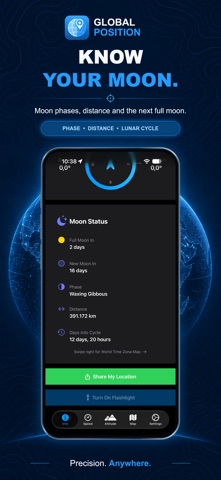
- Moon Status: phase, next full and new moon, distance and days into the lunar cycle
Widgets (New)
Position, Sun, Moon and Celestial View widgets for the Home Screen, with Position, Sun and Moon on the Lock Screen too: your coordinates and grid reference, the next sunrise or sunset with a countdown, today’s moon phase, or the Earth, Sun and Moon from the viewpoint you choose.
Siri and Shortcuts (New)
Ask “Where am I in Global Position?” or “When is sunset in Global Position?”. Hear your coordinates, altitude, the next sunrise or sunset, the moon phase or where the Sun and Moon are, copy your coordinates or share your location. Every action also works in the Shortcuts app.
Know How Good Your Fix Is
See the measured accuracy of your fix in metres, colour-coded Good, Fair or Poor, so you know whether to trust it.
Location and Map
- Automatic address lookup when online
- Standard, satellite and hybrid maps
- Follow your location, or your location and heading
Make It Yours
Light, dark or system appearance; metres or feet; your choice of speed unit.
Available in 24 Languages
Arabic, Chinese (Simplified and Traditional), Czech, Dutch, English, French, German, Greek, Hebrew, Indonesian, Italian, Japanese, Korean, Norwegian, Polish, Portuguese, Russian, Spanish, Swedish, Thai, Turkish, Ukrainian and Vietnamese.
Grid references stay in standard notation in every language, so your screen matches your paper map and everyone else’s radio call.
Built for the Field
Made for hikers, sailors, pilots, surveyors, field researchers, search-and-rescue teams, off-road drivers and travellers: anyone for whom knowing exactly where they are is not optional.
On iPad, GPS positioning requires a Wi-Fi + Cellular model.
What’s New
Version 4.5 · Celestial View, Widgets & Siri
- Celestial View: a new page in the astronomy card showing the Earth from space, with the Sun’s light, the Moon on its orbit and your position. Switch between North Pole, Side View and South Pole, and read the Sun’s and Moon’s elevation, bearing and the point where each is overhead.
- Widgets: Position, Sun, Moon and Celestial View for the Home Screen, with Lock Screen versions of Position, Sun and Moon.
- Siri and Shortcuts: ask for your coordinates, altitude, next sunrise or sunset, the moon phase or where the Sun and Moon are, copy your coordinates or share your location.
- Layout improvements and fixes.
Version 4.4 · World Time Zone Map
Swipe left on Solar Times to open the new World Time Zone Map.
- See where it is day, twilight or night around the world, updated every minute
- Civil, nautical and astronomical twilight shown as separate bands
- See where the sun and moon are directly overhead, with the Moon in its current phase
- Check the local time and UTC offset in 15 world cities, including daylight saving time
- Expand the map to full screen for more detail
- Works offline
Swipe left again to reach Moon Status.
Version 4.3 · Moon Status
Swipe left on Solar Times to discover the new Moon Status page.
- See how long remains until the next full moon
- See how long remains until the next new moon
- View the current lunar phase
- Check the Moon’s distance from Earth
- Follow the number of days elapsed in the current lunar cycle
- Clear swipe hints make switching between Solar Times and Moon Status easy
Moon Status is fully localized in all 24 supported languages.
Version 4.2 · 24 Languages
Global Position now speaks 24 languages. Every label, alert and button is translated — including the compass rose and the location permission prompt.
Speedometer
- The speed now rolls digit by digit as you accelerate, matching the heading readout on the Info tab.
- Fixed: the number stopped counting above 330 km/h. The coloured dial still pins at full scale, but the readout keeps going.
Settings
- Tell a Friend — pass Global Position on from the share sheet.
- Rate Us — opens the App Store review sheet directly.
Thank you for every rating and every recommendation. They are what keep this app going.
Version 4.1 · Reliability & Battery
This is a major reliability and battery release. Almost every screen has been reworked.
Battery
- Fixed duplicate location tracking — the app was running three overlapping GPS sessions and making redundant address lookups on every position update.
- Location and motion sensors now stop when you leave the app, and the compass sensor runs only while the compass is on screen.
- The GPS Accuracy setting now genuinely changes how the app tracks you. Low and Medium now save real battery.
Accuracy
- Fixed coordinates losing their hemisphere near the equator and the prime meridian.
- Fixed a crash when opening the Info tab between 80°N and 84°N.
- Speed no longer displays negative values when GPS has no usable reading.
- UTM, MGRS and UPS now appear only where each grid system is actually defined.
- MGRS grid references now match NGA and GEOTRANS output exactly.
- Position, speed and altitude show “—” while waiting for a fix, rather than zeros that looked like a real location off the coast of Africa.
- The GPS accuracy indicator now reflects your actual fix quality.
Compass, G-Force & Map
- The needle no longer swings almost a full turn backwards each time you face north.
- The G-force meter now measures motion only, with gravity excluded — 0.00 G at rest instead of 1.00 G.
- Map rebuilt on Apple’s current engine for smoother panning and zooming.
- The tracking button now correctly reflects whether the map is following you.
- Sharing your location no longer opens a blank sheet before your first fix.
International
- Numbers now use your region’s decimal separator (36,0 km/h).
- Sunrise and sunset follow your device’s 12- or 24-hour setting.
- Day length is now localised.
Also in this release
- A clear explanation and a shortcut to Settings if location access is off.
- Maximum altitude now records correctly below sea level.
- The solar progress bar advances while you are standing still.
- Smoother altitude graph that uses less power.
- VoiceOver improvements throughout.
- The flashlight no longer reports as on when the device has no torch.
Please note: your saved maximum G-force is reset by this update, because the meter now measures a different — and correct — quantity. Maximum speed and altitude records are unaffected.
Earlier Versions
4.0 (Mar 2025) — bug fixes, redesign · 3.5 (Jun 2020) — bug fixes, iOS 11 · 3.4 (Oct 2017) — status bar style · 3.3 (Apr 2017) — stability · 3.2.9 (Mar 2017) — speedometer HUD · 3.2.8 (Mar 2017) — iOS 7 UI · 3.2.7 (Feb 2014) — iOS 7 fix · 3.2.6 (Dec 2013) — bug fix · 3.2.5 (Dec 2013) — Dutch · 3.2.4 (Sep 2013) — language corrections · 3.2.3 (Aug 2013) — 8 languages, sunrise/sunset, Google Maps · 3.2.2 (Jun 2013) — speedometer fix · 3.2.1 (Dec 2012) — compass view, iOS 6 · 3.2 (Oct 2012) — decimal coords, altimeter · 3.1 (Sep 2012) — UTM/MGRS, flashlight, speedometer · 3.0 (Aug 2012) — SMS/email position, clipboard · 2.0 (Jun 2012) — degrees & minutes · 1.03 (May 2012) — iPad fixes · 1.02 (Dec 2011) — bug fixes · 1.01 (Nov 2011) — first release
Screenshots
iPhone




iPad



Ratings & Reviews
★★★★☆ 4.7 out of 5 · 3 ratings
You could add some more features at the future though.
Try it !!!!!!!!
Πολύ χρήσιμο ειδικότερα που γυρίζει ο χάρτης όπως το Google Maps

سلام چرا من نمیتوانم از این برنامه استفاده کنم اخه گناه ما چیه
ReplyDelete